
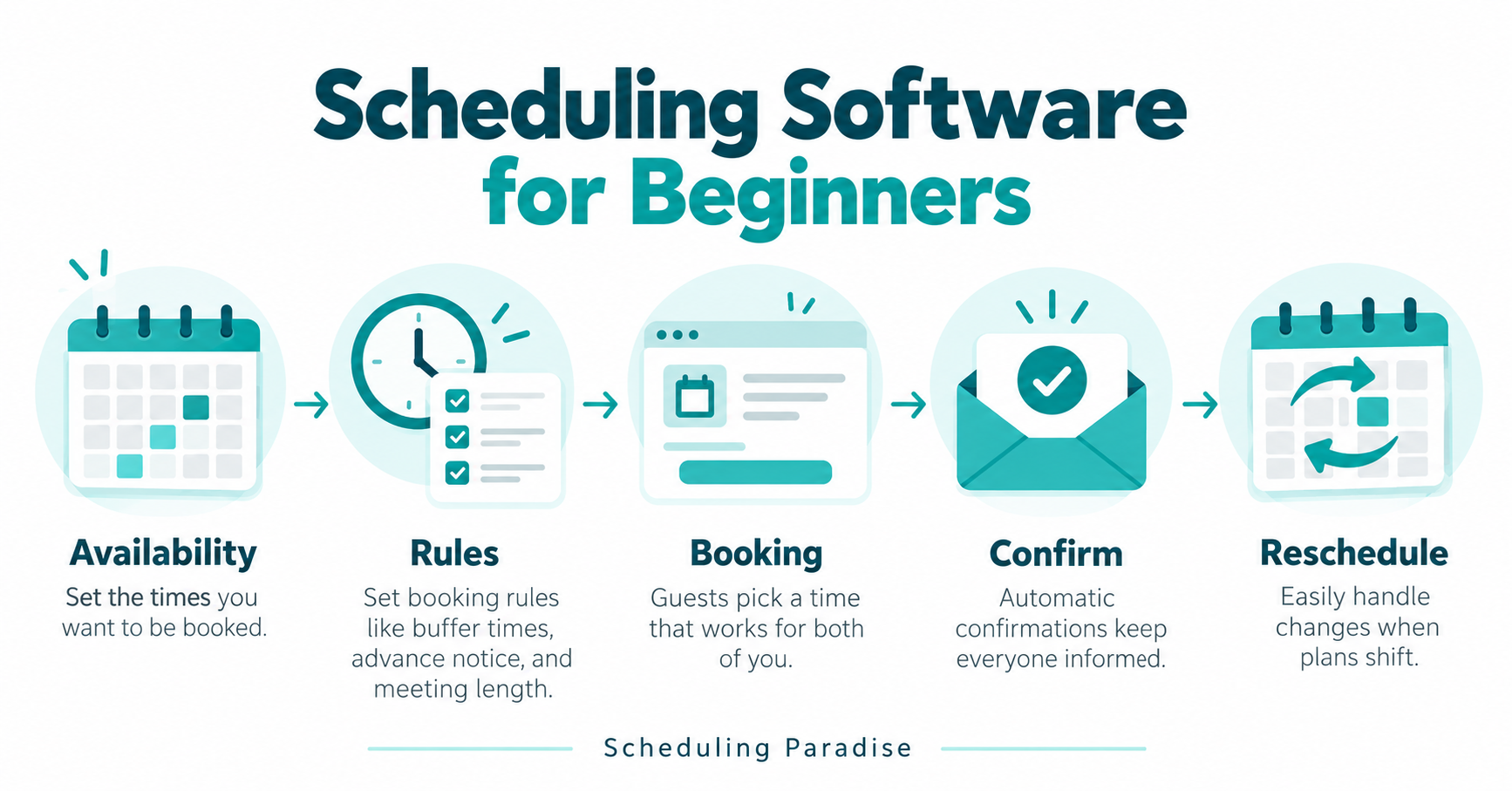
Scheduling software needs a clear appointment process before a booking link goes live. Define who is available, which calendar blocks time, what the visitor is booking and how changes reach the responsible person. A calendar grid alone does not explain preparation requirements, a cancellation policy or an appointment held in the wrong time zone.
This guide helps a small business prepare a scheduling workflow and evaluate software through a controlled pilot. Examples are hypothetical. No product ranking or direct testing claim appears here. Confirm current features, plans and permissions with the provider, and obtain qualified advice for payments, privacy and sector-specific obligations.
Read the editorial standards for our research approach. The Scheduling Paradise Blog will collect supporting research as the publication grows.
In this guide
- Define what each appointment promises
- Choose the calendar responsible for availability
- Make time zones explicit
- Set working hours and date exceptions
- Define lead time, buffers and booking limits
- Ask only for information needed to prepare
- Write confirmations people understand
- Make rescheduling and cancellations predictable
- Plan team assignment and shared resources
- Compare software with observable requirements
- Test integrations and permissions deliberately
- Run a small pilot before sharing the link widely
- Questions to answer before choosing a system
- Prepare one dependable appointment workflow
Define what each appointment promises
Begin with the appointment outcome. A discovery call, paid consultation, equipment demonstration and support session require different preparation and ownership. Give the appointment a plain title and explain what the attendee should expect. Avoid a vague label such as “meeting” when the visitor needs to choose between several different services.
Write the operational details before configuring the form. Record the duration, host, location or meeting method, preparation requirements and the action following the appointment. State who handles questions before the session. If an appointment is a request awaiting review rather than a confirmed reservation, explain the distinction clearly on the booking page and in the confirmation.
Keep the initial appointment catalog small. Separate types when the preparation, length or responsible team differs materially. Avoid making a new type for every marketing campaign. A growing list creates maintenance work and increases the risk of stale rules. Assign an owner to each type and set a review date for its public description.
Choose the calendar responsible for availability
Decide which calendars determine whether a host is busy. A personal calendar, shared team calendar and service-specific calendar often contain different commitments. Identify the source of each appointment and the account responsible for maintaining working hours. A scheduling tool checking the wrong calendar produces misleading availability even when the booking page looks correct.
Test calendar events with different states. A tentative event, an all-day absence and a manually added appointment might affect availability differently. Write down the expected behavior and compare the public booking page. Do not assume every event blocks time. Confirm the selected provider's documented handling and test the scenarios relevant to your business.
Establish a rule for manual changes. Staff sometimes move an appointment directly in their calendar instead of using the scheduling system. Decide whether this action updates the booking record, notifications and meeting details. If the connection does not support the required flow, teach staff the supported route and document the exception. Avoid maintaining contradictory records in two systems.
Make time zones explicit
An appointment needs a date, time and time-zone context. A visitor's device setting is not evidence of the visitor's intended location. Show the selected time zone clearly and provide a way to review or change the selection where appropriate. Repeat the appointment's time information in the confirmation and rescheduling process so the attendee has another opportunity to spot an error.
Calendar formats also distinguish ways of representing time. The IETF's iCalendar specification, RFC 5545, defines calendar data structures including date-time values and time-zone components. For a business workflow, the practical test is whether an exported or connected event retains the intended appointment time across the systems your staff and customers use.
Test a booking across two named time zones and a date near a daylight-saving change where relevant. Use the provider's supported time-zone selection rather than manually adding a fixed number of hours. Repeat the test after rescheduling. Record the displayed time in the booking page, confirmation and host calendar. Investigate differences before sharing the public link widely.
Set working hours and date exceptions
Weekly availability is a starting pattern, not a complete operating calendar. Define ordinary working hours and then review holidays, leave, training and temporary changes. Assign someone responsibility for date-specific exceptions. A staff member leaving a team or changing working days should trigger a review of all booking pages using the person's calendar.
Keep a clear boundary between publicly bookable hours and ordinary working time. A consultant might work throughout the day but reserve only certain periods for calls. Explain how urgent requests are handled outside the published schedule. Do not expose the entire workday merely because a calendar connection makes every empty slot selectable.
Use a recurring reminder to inspect future availability. Look beyond the current week and confirm the booking horizon. A schedule ending unexpectedly next month creates a different visitor experience from a deliberately closed calendar. Record who checks exceptions and what happens when no availability is shown. Give the visitor an appropriate contact path for genuine booking problems.
Define lead time, buffers and booking limits
Lead time controls how close to the appointment someone is allowed to book. A buffer reserves time around an appointment for preparation, travel or follow-up. Daily limits help prevent an unrealistic number of sessions. Define these rules from the work involved, rather than copying another company's booking page or accepting every default setting.
As one documented example of these concepts, Google Calendar's appointment-schedule instructions describe availability, time-zone and buffer settings. Feature availability varies, and this reference is not a vendor recommendation. Inspect the current documentation and plan requirements for whichever system you evaluate. Use the concepts as test cases instead of assuming identical behavior across providers.
Work through a hypothetical forty-five-minute consultation requiring fifteen minutes of preparation and fifteen minutes of notes afterward. Decide which periods need protection and how adjacent manual calendar events interact with those periods. Then try booking the last available slot in the day. Confirm the complete commitment fits the intended working hours, including any necessary travel or handoff.
Ask only for information needed to prepare
A short booking form should help the host deliver the promised appointment. Ask for an appropriate contact method, a useful topic summary and the minimum preparation details. Explain required fields. Avoid collecting sensitive records merely because the form builder offers file uploads or a large notes box. Direct private documents through the business's approved channel.
Separate scheduling questions from qualification decisions. A booking form does not need a full discovery questionnaire when the first call is intended to gather information. Review each field by asking who uses the answer and what action follows. Remove questions nobody reviews. Give the visitor enough context to provide a useful answer without pasting confidential information.
Review data handling before connecting the form to other tools. The FTC's business guidance on protecting personal information emphasizes understanding stored information, limiting unnecessary collection and controlling access. Apply the organization's approved privacy and retention process to booking records, notes, exports and automated notifications. This guide does not determine legal compliance for a particular business.
Write confirmations people understand
A confirmation should identify the appointment, date, time zone, host and location or meeting link. Include the essential preparation instructions and a clear route for changes. Avoid filling the message with promotional material. The attendee should understand whether the booking is confirmed, pending review or waiting for a separate payment or document step.
Check the host's version too. Staff need enough information to prepare without opening several unrelated systems. Use a consistent appointment reference and link to the approved booking record. Avoid copying confidential form answers into every notification. Confirm which recipients receive each message, including shared inboxes or external collaborators, before enabling the workflow.
Test the actual messages on mobile and desktop. Long meeting links, missing line breaks and unclear time-zone labels create practical problems. Follow the reschedule and cancellation links using a test appointment. Confirm the destination explains the action and reflects the latest booking state. A successful email delivery does not prove the attendee has a usable confirmation.
Make rescheduling and cancellations predictable
Write the change policy in plain language. Explain the supported notice period, how to request a change and who handles exceptions. Keep the public page and messages consistent. If payment or a contractual commitment is involved, use the business's approved terms and adviser-reviewed process rather than inventing a policy inside a software setting.
Test the entire rescheduling chain. The old time should be handled correctly, the new time reserved and the responsible people informed. Review the meeting link and any connected work record. If a different host takes the new slot, check whether the attendee receives the correct details and whether the original host's calendar is released through the supported workflow.
Cancellation also requires a downstream decision. A team might close a preparation task, record a reason or offer a follow-up route. Decide which actions are necessary and which require human review. Avoid automatic repeated messages after a customer has canceled. Document how staff stop a reminder sequence and confirm the system's actual behavior with a synthetic booking.
Plan team assignment and shared resources
Team scheduling introduces questions beyond individual availability. Decide whether the visitor chooses a person, the system distributes appointments or a coordinator assigns requests. Define the criteria in business terms. A distribution rule intended to balance workload should be tested alongside working hours, service eligibility and the ability to handle the requested appointment.
Shared resources need their own constraints. A room, demonstration device or vehicle might be required even when a staff member is free. Check how the selected system represents the resource and prevents conflicting reservations. Test a scenario involving two available hosts and one shared resource. Do not rely on the host calendar alone to represent every operational limit.
Assign an exception owner for failed routing or missing staff. Record what happens when every eligible host is unavailable and how temporary leave affects assignment. If a coordinator needs to override a rule, specify the review required and the notifications sent. Keep the workflow understandable enough for another team member to cover during an absence.
Compare software with observable requirements
Write requirements as actions with a visible result. Replace “easy integrations” with “a confirmed booking creates one calendar event and rescheduling updates the same appointment without duplicates.” Replace “good reminders” with a message, recipient, timing rule and tested cancellation behavior. Give each requirement a responsible reviewer and an acceptance condition.
| Area | Pilot scenario | Evidence to keep |
|---|---|---|
| Availability | Busy events and date exceptions remove the intended slots | Reviewed booking-page examples |
| Time zones | Two attendees view the same appointment in different named zones | Booking, confirmation and calendar results |
| Buffers | Adjacent appointments retain required preparation time | Before-and-after calendar state |
| Forms | Required details reach the host without unnecessary private data | Synthetic record and notification review |
| Changes | Reschedule and cancel a test booking | Updated record, event and notification outcome |
| Teams | Route a booking when one eligible host is away | Assignment result and exception process |
| Export | Recover understandable appointment records | Sample export and field definitions |
Separate essential requirements from preferences and record unresolved questions. Confirm current limits on users, calendars, appointment types, reminders, exports and integrations directly with the provider. Include ongoing administration in the cost review. A lower subscription price does not establish a better fit if the team must repair scheduling exceptions manually after every booking.
Test integrations and permissions deliberately
List each connected service and the reason for the connection. A calendar, meeting platform, customer record and payment service have different responsibilities. Define which system owns the appointment status. Use the minimum permissions appropriate to the intended workflow and review the actual access requested. A familiar product name does not explain a particular permission scope.
Use synthetic attendees and test records where possible. Verify how failed transfers are reported, who sees the error and how a retry avoids duplicate events. Interrupt a permitted test connection and observe the recovery path. Preserve a reference connecting the original booking to the resulting calendar or work record. Document the steps staff follow during an outage.
Plan access removal when roles change. Booking records and notes should not depend on an unmanaged shared login. Confirm the responsible administrator, alternate owner and export process. Review who receives notifications after a staff departure. Preserve necessary historical records through the approved retention process without leaving former staff connected to current appointments.
Run a small pilot before sharing the link widely
Choose one appointment type and a limited set of staff. Define the pilot period, test attendees and rollback process. Review every test booking rather than relying only on a dashboard total. Include a time-zone difference, a blocked date, an appointment near closing time, a reschedule and a cancellation. Ask a second person to follow the process without coaching.
In a hypothetical pilot, a two-person service team tests a thirty-minute introduction call. One person owns availability rules and the other reviews messages and exception handling. The team books several synthetic appointments, moves one across a time-zone boundary and cancels another before the reminder time. Success means the calendars, records and messages match the agreed rules. No improvement in attendance or revenue is assumed.
Record a small set of measures with clear definitions. Review booking exceptions, manual corrections and the time required to resolve them. State the observation period and number of appointments. Compare similar work before drawing conclusions. Keep an owner and next action for each unresolved issue. Expand only after the team understands the normal process and recovery steps.
Questions to answer before choosing a system
Does every business need a public booking page?
Some appointments require review before a time is confirmed. A public self-service calendar suits a defined service with reliable availability and clear preparation rules. A request form or coordinator-led process often fits more complex work. Choose based on the actual customer promise, staff constraints and information needed before acceptance.
Should reminders replace personal preparation?
Reminders communicate the agreed appointment details. They do not prepare the host or resolve missing documents by themselves. Decide who checks readiness and how exceptions are handled. Test the messages and cancellation rules. Measure attendance only after a defined observation period rather than assuming automated reminders guarantee a result.
What matters when switching tools?
Preserve appointment references, future bookings, relevant history, field definitions and approved exports. Test whether meeting links, calendar events and change links still work after migration. Tell staff which system to use from the cutover date. Avoid running two public booking processes with overlapping availability unless the design explicitly prevents conflicting reservations.
Prepare one dependable appointment workflow
Write the appointment promise, calendar ownership, time-zone rules, availability, preparation and change process. Test the workflow with ordinary bookings and realistic exceptions. Select software based on demonstrated requirements and maintain a clear owner for ongoing updates.
Visit the homepage for Scheduling Paradise's scope and the Blog for supporting guides. Use the contact page to suggest a correction or topic. Keep private customer details and account information out of messages to the publication.

Trevor Fenner publishes software research and practical business workflow guides. Scheduling Paradise distinguishes documented capabilities, hypothetical examples and direct testing. Read the editorial standards for the research process.